If you run your business alone, marketing is the first thing that falls off the table. You finish the orders, answer the customer messages, and there’s nothing left in the tank for content. Maybe you hired someone and got back generic work, or they moved on. So here’s exactly how I use AI to keep my marketing running anyway — with no marketing team, and without writing a single line of code.
This works whether you sell a service — coaching, consulting, an agency, a clinic — or a physical product — a shop, handmade goods, an e-commerce store. If you’re a small or medium business owner or founder who wants to grow but can’t afford (or manage) a full marketing team, this is the setup for you.
I’m not technical. I can’t code. I run this as, basically, a one-person company. And the marketing still ships every week.
The trick is knowing that “using AI for marketing” isn’t one thing. It’s three layers, and most people only ever touch the first one — which is why they feel busy with AI but nothing actually gets built.
What does “using AI for marketing” actually mean?
Using AI for marketing means handing the repeatable work — ideas, scripts, captions, images, even whole systems — to AI tools that do it on your instruction, so your content keeps going out without you doing every step by hand. The best setup for a small business isn’t one chatbot; it’s a ladder of three tools: one to think with, one to plan and make files with, and one to build the actual systems. You climb the ladder as the job gets bigger.
Here’s the ladder I use every day.
The 3 layers: Chat, Cowork, and Claude Code
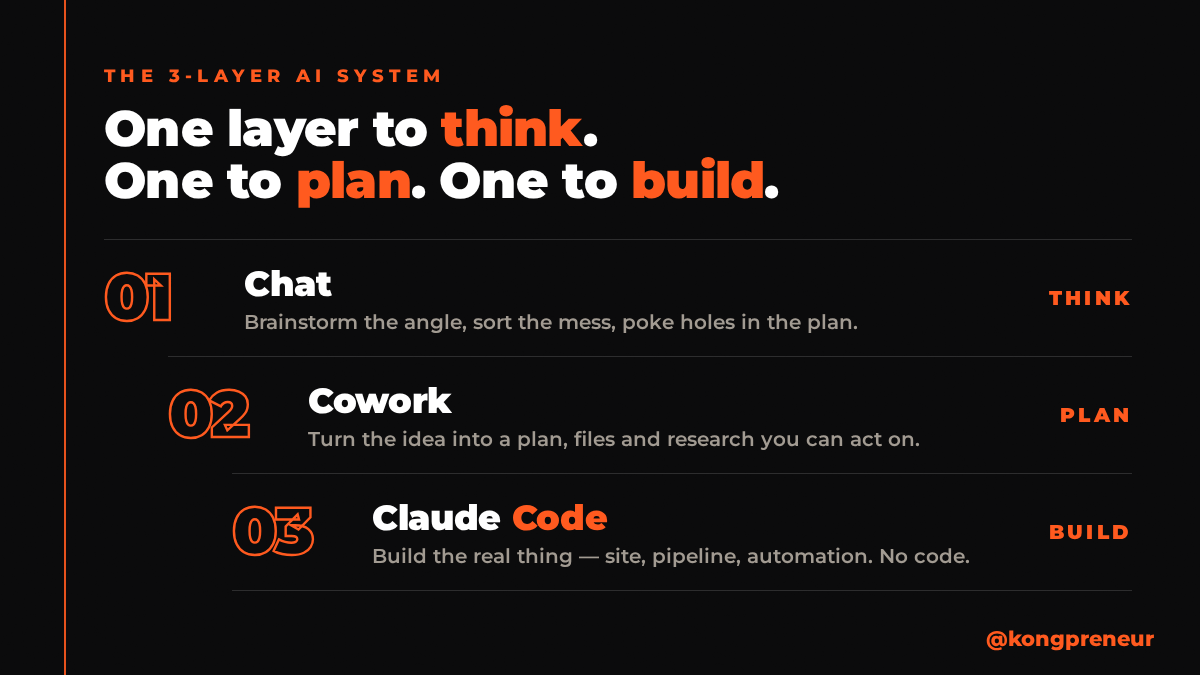
Layer 1 — Chat: for thinking, not doing
A chat is your second brain. When you don’t yet know what you want — you’re stuck on ideas, or your head is messy — you just talk to it. Brainstorm the angle, sort the mess, ask it to poke holes in your plan.
That’s all a chat is for: ideas. Don’t try to build your marketing here. Example: “I sell handmade candles and I have no time for content. Give me 10 post ideas that don’t need me on camera.” That’s layer one working.
For everyday tasks I use a fast model; for tougher thinking I switch to a stronger one. You don’t need to overthink it — start simple and step up only when the answers feel thin.
Layer 2 — Cowork: for planning and making
When you’re ready to actually do something — a content plan, a strategy, the whole blueprint — you move up to a workspace that can make files, do research for you, and connect to your other tools. This is where the heavy lifting happens: it turns a loose idea into a plan you can hand off and act on.
The difference from a chat: a chat only talks back. A workspace produces — it writes the file, builds the plan, pulls the research. Example: “Here are my 10 approved ideas. Turn them into a month of posts, write the captions, and give me an image brief for each.” You walk away with a real plan, not a conversation.
Layer 3 — Claude Code: for building the real thing
When the blueprint is ready, it goes to the builder — the layer that actually constructs things. This is how my entire website got built: SEO-friendly, with an FAQ and all my images, and I never touched the code. When I don’t like something, I say so in plain English and it changes it.
This is the layer people assume is “too technical for me.” It isn’t. You describe what you want; it lays the bricks. Example: “Build me a simple landing page for my candle workshop, with a sign-up form and three testimonials.” You review it and ask for changes — that’s the whole skill.
Where exactly do you use AI in your marketing? (real examples)
The layers make sense in theory, but here’s where they actually touch your day-to-day marketing. These are the exact jobs I run, and the tools I use for each — swap in whatever equivalents you already pay for.
1. Social media posts — plan, draft, and schedule
This is the job that eats most owners alive, and it’s the easiest one to hand over. I use Cowork to plan a month of posts and draft the captions from my approved ideas, then I schedule them so they go out on their own — I use FeedHive, but you can use Metricool, Buffer, or whatever scheduler you already have. The tool doesn’t matter; the system does. You brief it once, approve the batch, load it into the scheduler, and your feed runs for weeks without you sitting down to “post today.”
2. Build your website or landing page — with Claude Code
If you sell a service, you need pages that explain it and capture leads. If you sell products, you need a site that actually sells. I built my whole website with Claude Code — no developer, no code — just describing what I wanted and asking for changes until it was right. A single landing page for one offer works the same way, and you can have it live in an afternoon.
3. Turn one video into a week of content
Record one video (or even a voice note), and use Cowork to pull it apart into a blog post, a set of social captions, and an email. One piece of thinking becomes a week of marketing. This very blog post started as a video I recorded — the AI turned it into the article you’re reading.
4. Product descriptions and service pages that sell
For physical products, AI writes descriptions that highlight the benefit, not just the specs. For services, it writes the “here’s what you get” pages that turn a visitor into an enquiry. Give it your rough notes and your customer’s real problem, and it drafts copy you’d otherwise pay a copywriter for.
5. Make talking-avatar videos — with HeyGen
If you want to show up on camera without filming yourself every time, use HeyGen to make talking-avatar videos. You write the script (or let AI write it), and the avatar delivers it — great for tutorials, tips, and announcements when you don’t have time to record. It’s how you keep a face on your content without a studio day.
6. Make product videos — with kie.ai
For physical products, a short video sells far better than a photo. I use kie.ai to turn product images into proper product videos — the kind you’d run on TikTok, Reels, or a product page — without hiring a videographer. Feed it your product, and you get scroll-stopping video content you can post the same day.
Which should you use — Claude Chat, Cowork, or Claude Code?
Use the simplest layer that fits the job, and climb only when you outgrow it:
- Stuck on ideas, or just want to think? → Chat.
- Turning ideas into a plan, files, or research? → Cowork.
- Building an actual system — a site, a content pipeline, an automation? → Claude Code.
Most people stay on layer one forever and wonder why AI “didn’t really change anything” for their business. The change happens when you let the higher layers make and build, not just answer.
A quick note on ChatGPT vs Claude, since owners always ask: I tested ChatGPT, Gemini and Claude, and for marketing writing — scripts, captions, anything that has to sound human — I prefer Claude. For general research or quick lookups, ChatGPT is strong too. Pick by the job, not the hype.
Can a small business owner really do this without coding?
Yes. A non-technical business owner can run all three layers, because the “skill” is describing what you want in plain language and giving feedback — not programming. I built a full website, a newsletter system, and a video-making pipeline this way, and I still can’t read code. If you can brief a freelancer clearly, you can brief these tools.
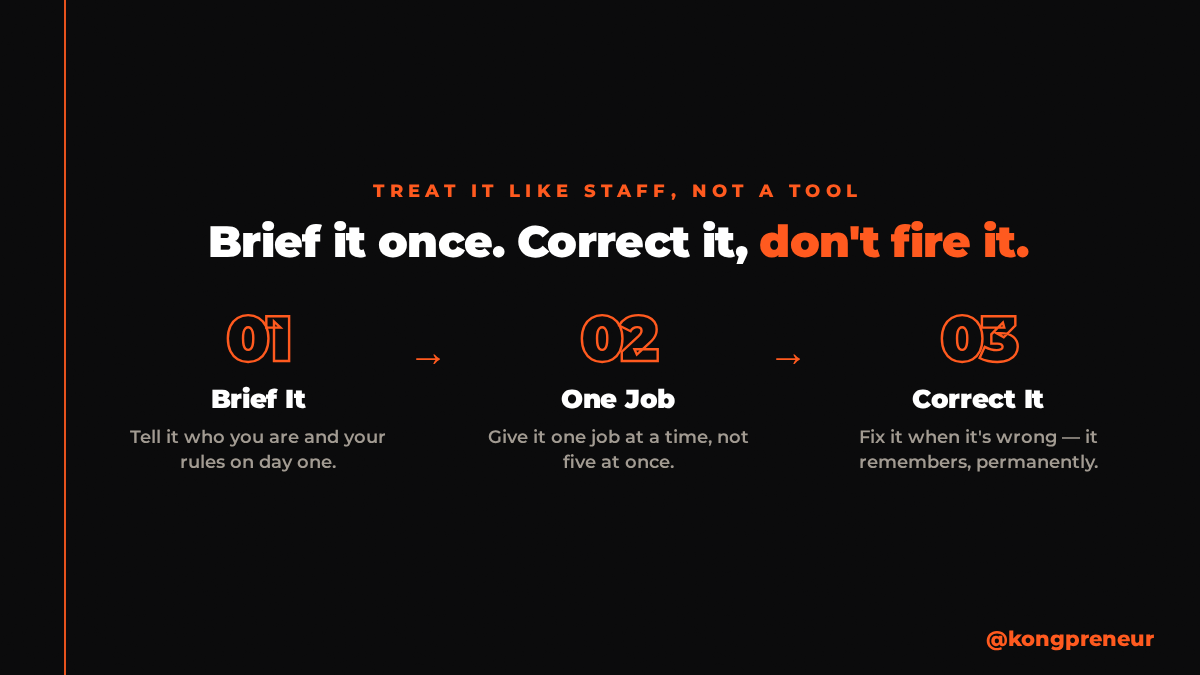
The mindset that makes it work: treat the AI like a new staff member. Tell it who you are and your rules on day one, give it one job at a time, and correct it when it’s wrong instead of firing it. That’s how an ordinary owner ends up with a set of AI Agent Employees doing the marketing work that used to depend on staff who quit.
What does it cost to use AI for marketing?
There are free tiers to start, and paid plans (usually a low monthly fee) once you want to build heavier things like a website or an automated content pipeline. Compared to a marketing hire or a monthly agency retainer, it’s a fraction of the cost — and it doesn’t take sick leave or hand in its notice. To put a real number on it: my entire AI marketing setup costs about 22% of what a full-time content creator would cost me here in Malaysia — roughly a fifth of the price, doing the work that used to need a person. Start on a basic plan, prove it earns its keep on one task, then scale up only when the work demands it.
Start today — one step
Don’t try to build everything at once. Open any AI chat, describe your messiest recurring marketing task out loud, and ask it to break that task into clear steps. That’s layer one. The moment you see the steps written down, you’ll feel whether this could run without you — and that feeling is the whole reason to start.
FAQ
How do I use AI for marketing if I’m not technical?
Start with a chat for ideas, move to a workspace (Cowork) to turn those ideas into plans and files, and use a builder (Claude Code) for anything that needs to be built. The skill is describing what you want in plain words, not coding.
What is the best AI for business marketing?
For marketing writing that has to sound human — scripts, captions, posts — I prefer Claude. For broad research or quick answers, ChatGPT is also strong. The best choice depends on the task, so match the tool to the job rather than picking one for everything.
Can Claude Code be used for small businesses?
Yes. A non-technical small business owner can use Claude Code to build real things — a website, a landing page, a content system — by describing what they want and giving feedback. I built my own website with it and I can’t code.
Which is better, Claude Code or Claude Cowork?
They do different jobs. Cowork is for planning, research and making files; Claude Code is for building working systems from that plan. Use Cowork to design it, Claude Code to build it.
How much does it cost to use AI for marketing?
Most tools have a free tier to start and a low monthly paid plan to scale. It costs far less than hiring a marketing person or paying an agency retainer every month.
Want this built with you? In my private AI Agents for Marketing training, you and your team build your own marketing AI agents with Claude over 2.5 days — hands-on, no code, with 120 days of WhatsApp support after. See the training →